Accessibility Toolkit: Logging report
Table of Contents
Introduction
The Logging report has switched over the logging of all usage, actions, and user interactions with the Toolkit, into a dedicated logging system within the Toolkit itself. This allows each institution to maintain their Toolkit usage data over time, regardless of their site standard logging practises.
The logging data is generated by user interactions, such as viewing the Toolkit reports, fixing content with the Toolkit wizards, viewing the Accessibility modal guides, viewing the individual check modal guides, and so on. The logging data is then stored in a Toolkit database table, and is then viewable via the Toolkit logging report.
The report displays the main data on Toolkit usage in a line chart over time, with a link to view the chart data in a table underneath. The data can be filtered and is explained in more detail below.
Where to find the Logging report
The Logging report can be accessed via:
- From Site administration: Site administration > Plugins > Admin tools > Accessibility+ > Go to reports > Logging report
- From a course: Course actions menu > Brickfield Accessibility+ Toolkit > Logging report
- From the course block: Accessibility+ Review block > View Accessibility+ report (Chart icon) > Go to reports > Logging report
How to use the Logging report
The Logging reports line data can be filtered for different breakdowns of the Toolkit’s usage.
The filters for this report are on the right side of the page.
View the Toolkit’s usage
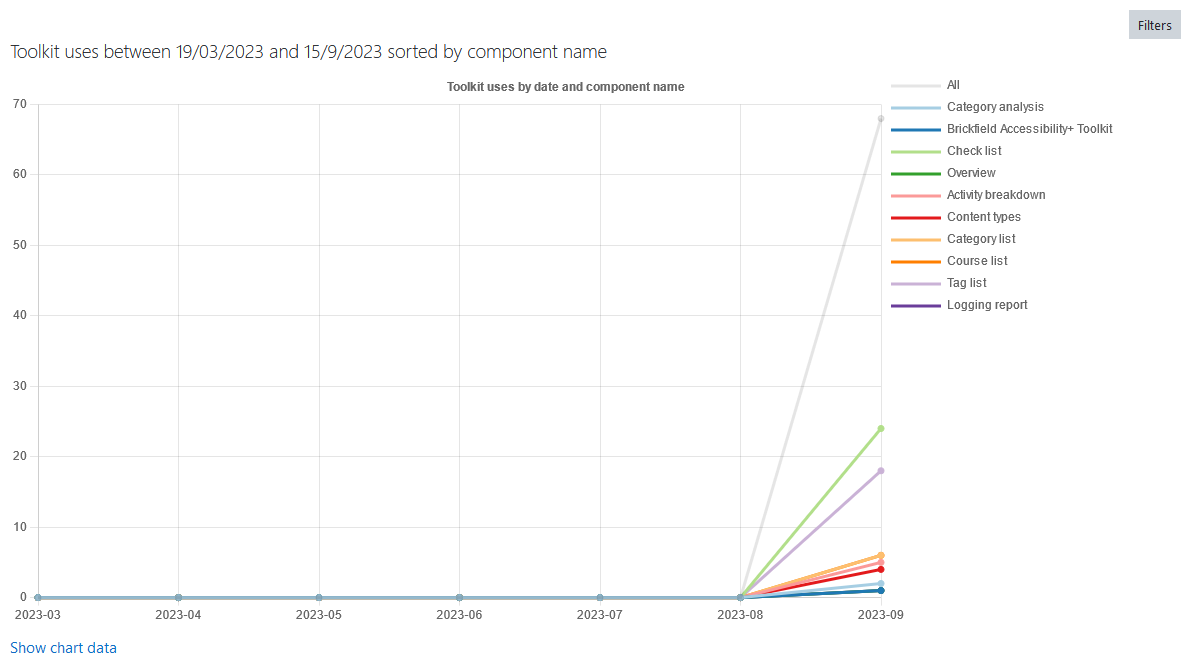
To view the Toolkit’s usage:
- Ensure you are viewing the “Logging report”.
- Select the relevant options in the filters.
- Select the “Filter” button.
Additionally, for the graph chart view, there is a colour blind filter which supports:
- Protanopia
- Deuteranopia
- Tritanopia
The available filters for the Logging report
The filters available are:
- Date from
- Date to
- Line data
- Component name
- Event
- User
- Course
- Category
- Colour blind options
Capability Requirements
Access to the Brickfield Accessibility+ Toolkit is controlled by capabilities and users must have the correct capabilities in the correct context.
- ‘tool/bfplus:viewsystemtools’ capability – To view site level reports and wizards.
- ‘tool/bfplus:viewcoursetools’ capability – To view individual course reports and wizards.
- ‘accessibilityplustool/loggingreport:view’ capability – To view this Logging report, users must have this and one of the capabilities mentioned above.
For more information, see: Capabilities.