
Accessibility Toolkit: Summary report
Table of Contents
Introduction
The Summary report provides a breakdown of the errors found within an individual course and is a combination of many of the Find tools found within the Brickfield Accessibility+ Toolkit.
You can also download a PDF transcript of the course with the “Download PDF” link located in the top right of the report.
Where to find the Summary report
The Summary report can be accessed via:
- From site administration: Site administration > Plugins > Admin tools > Accessibility+ > Go to reports > Summary report
- From a course: Course actions menu > Brickfield Accessibility+ Toolkit > Summary report
- From the course block: Accessibility+ Review block > View Accessibility+ report (Chart icon) > Go to reports > Summary report
How to use the Summary report
The Summary report displays five tables for the breakdown of errors:
- “Top errors” displays the accessibility checks with the highest number of errors found.
- “Failed activities” displays the activities with the highest number of errors found.
- “Check errors” displays the total errors found per HTML content type.
- “Activity pass ratio” displays the total number of passed and failed activities for each type.
- “Error details” displays the first 10 errors found.
Download the accessibility PDF transcript
The accessibility PDF transcript can also be downloaded from the Accessibility+ Review block.
To download the accessibility PDF transcript:
- Ensure you are viewing the “Summary report”.
- Select the “Download PDF” link.
View the breakdowns of the errors in the course
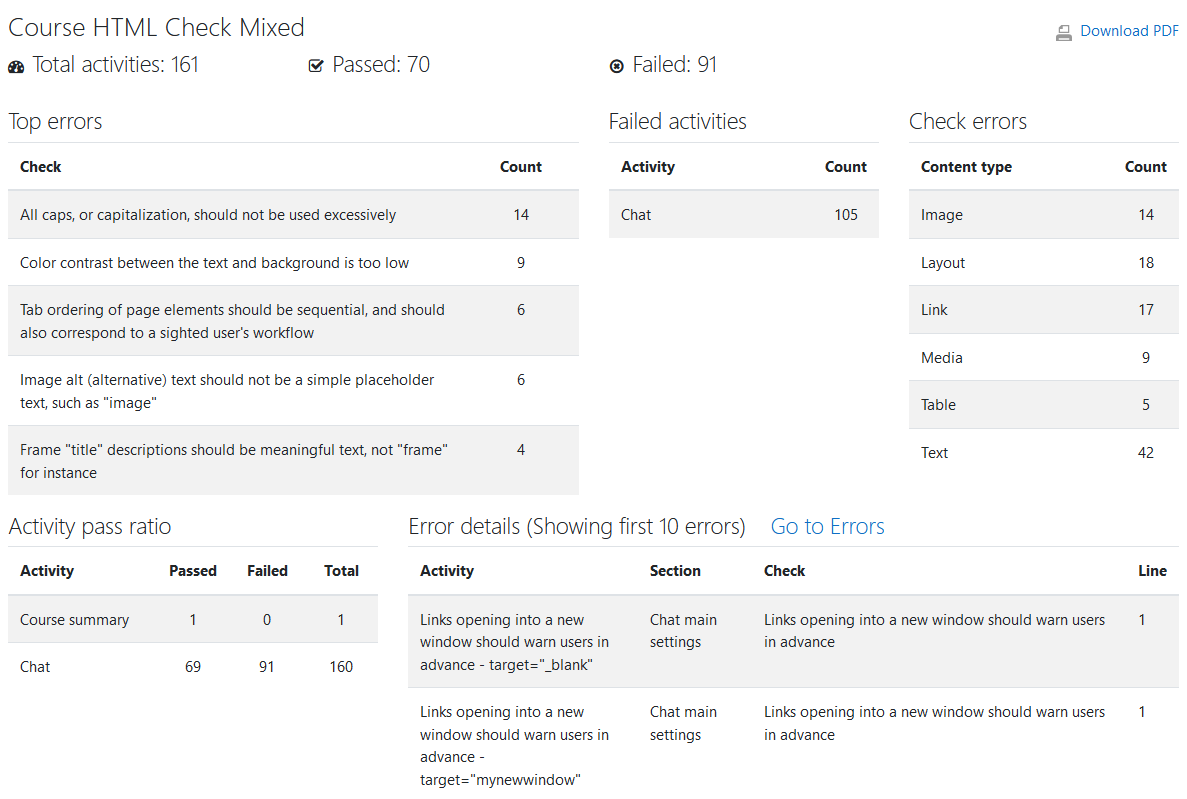
To view the breakdowns of the errors in the course:
- Ensure you are viewing the “Summary report”.
- View each table in the report for a different breakdown of the errors.
Capability Requirements
Access to the Brickfield Accessibility+ Toolkit is controlled by capabilities and users must have the correct capabilities in the correct context.
- ‘tool/bfplus:viewsystemtools’ capability – To view site level reports and wizards.
- ‘tool/bfplus:viewcoursetools’ capability – To view individual course reports and wizards.
- ‘accessibilityplustool/printable:view’ capability – To view this Summary report, users must have this and one of the capabilities mentioned above.
For more information, see: Capabilities.