
Accessibility Toolkit: Tag list report
Table of Contents
Introduction
The Tag list report displays configured tags and their summaries per content type. This Tag list report displays standard Moodle tags that have been listed in the “Tags” global setting of the Brickfield Accessibility+ Toolkit, for more information, see: Configuration.
It has three different views, as tabs:
- “Display amount” to display course activities failed per tag.
- “Display error totals” to display course error totals per tag.
- “Display percentage” to display course activities pass rate % per tag.
Where to find the Tag list report
The Tag list report can be accessed via:
- From site administration: Site administration > Plugins > Admin tools > Accessibility+ > Go to reports > Tag list
- From a course: Course actions menu > Brickfield Accessibility+ Toolkit > Tag list
- From the course block: Accessibility+ Review block > View Accessibility+ report (area chart icon) > Go to reports > Tag list
How to use the Tag list report
The Tag list report displays three views for the breakdown of tags.
The table displays a row for each Tag that contains ten parts:
- Tag
- Num of courses
- Courses
- Total activities
- Image
- Layout
- Link
- Media
- Table
- Text
View the activities failed per tag
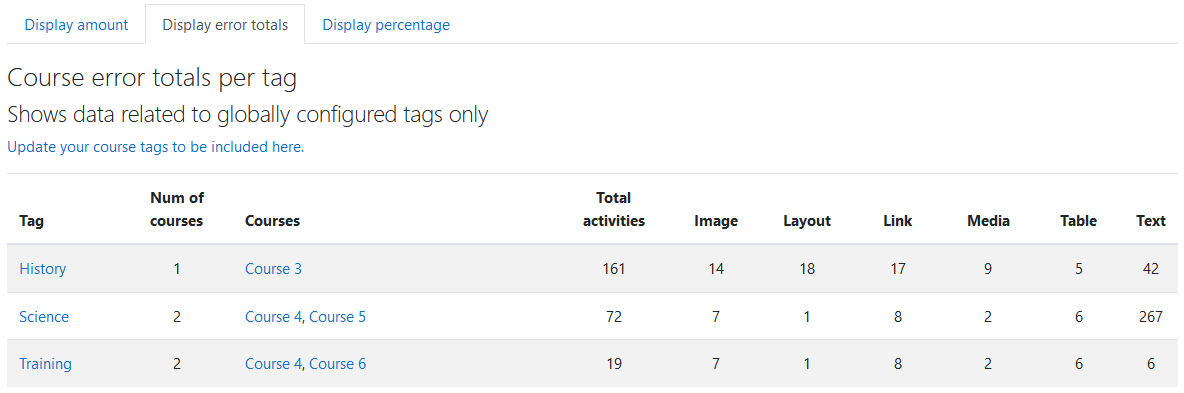
To view the activities failed per course:
- Ensure you are viewing the “Tag list” report.
- Select the “Display amount” tab.
View the error totals per tag
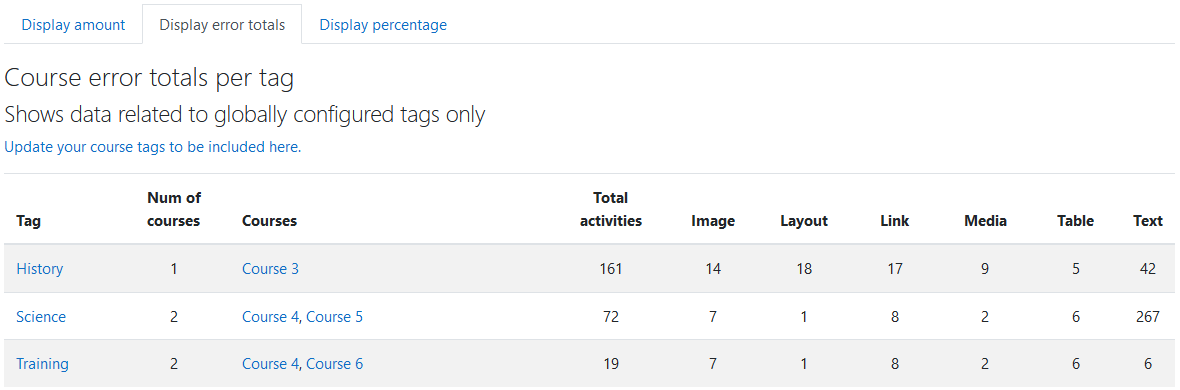
To view the error totals per tag:
- Ensure you are viewing the “Tag list” report.
- Select the “Display error totals” tab.
View the activities pass rate % per tag
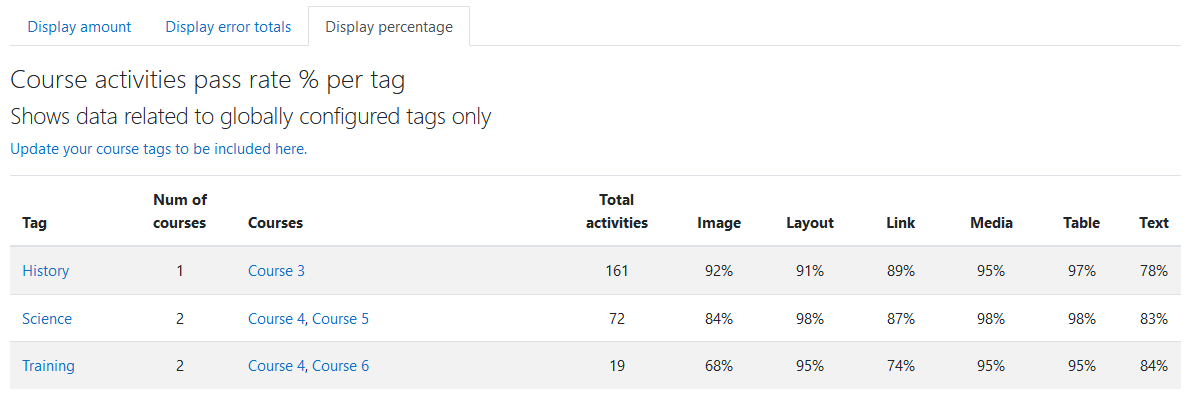
To view the activities pass rate % per tag:
- Ensure you are viewing the “Tag list” report.
- Select the “Display percentage” tab.
Capability Requirements
Access to the Brickfield Accessibility+ Toolkit is controlled by capabilities and users must have the correct capabilities in the correct context.
- ‘tool/bfplus:viewsystemtools’ capability – To view site level reports and wizards.
- ‘tool/bfplus:viewcoursetools’ capability – To view individual course reports and wizards.
- ‘accessibilityplustool/coursetags:view’ capability – To view this Tag list report, users must have this and one of the capabilities mentioned above.
For more information, see: Capabilities.