Page Options: Teacher
Introduction
The Page Options block gives every reader a small, self-contained set of on-page tools to adjust how Moodle looks and reads: text size, colour theme, and read-aloud.
The Page Options block was formerly the Accessibility block; it was renamed to avoid confusion with the accessibility-review tools in the Brickfield Toolkit (Accessibility Review, Review+, and Overview).
It is a complete rewrite and simplification of the original block. It runs entirely in the reader’s browser — there is no third-party toolbar, no server round-trips, and no database table. Read-aloud uses the browser’s own built-in speech, so nothing extra is loaded.
Once a reader chooses a setting it follows them across the whole site: preferences are kept in a single functional cookie and reapplied before each page paints, so there is no flash of the default styling as the reader moves from page to page — even on pages where the block itself is not shown.
Usage
- Turn editing on for the page where you want the tools to be engaged with (a course, the Dashboard, or any other page that shows blocks).
- Add the Page Options block from the “Add a block” list.
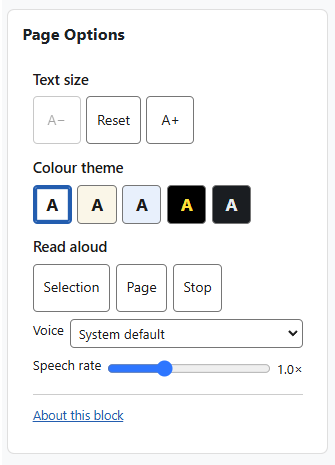
- Readers can now use the controls in the block:
- Text size — use A−, Reset and A+.
- Colour theme — choose Default, Cream, Blue, High contrast or Dark.
- Read aloud — choose “selection” or “page”, pick a voice (on-device voices, or System default), adjust the speech rate, and use Stop.
- A reader’s choices are remembered and reapplied automatically across the site, so the block usually only needs to be added in one place (for example the Dashboard).
Features
Accessible by design. The block’s own controls are real, keyboard-operable buttons with screen-reader labels; changes are announced through a live region; the selected theme is shown with more than colour alone; and the block honours reduced-motion and Windows High Contrast (forced-colours) settings. Built to WCAG 2.2 AA.
Private by design. No personal data is stored, transmitted, or processed. The text size, colour theme and read-aloud voice choices are held only as a functional preference in the reader’s own browser, and the block does not read that preference on the server.