
Brickfield Enable: Hidden errors
Table of Contents
Introduction
The Hidden error page allows the institution to monitor the list of accessibility errors being hidden as exceptions, and to unhide any errors if needed.
It lists all errors that have been previously selected to be hidden when submitting a bulk fix. These specific errors will no longer display within the bulk fix wizards or reports unless they are subsequently unhidden.
N.B.: In the top right of the Hidden errors page is a “Help docs” button that will bring your directly to this documentation page.
Where to find the Hidden errors page
The Hidden errors page can be accessed via:
- From Site administration: Site administration > Brickfield Enable > Accessibility management > Go to reports > Admin > Hidden.
- From a course: Course actions menu > More > Brickfield Accessibility+ Toolkit > Admin > Hidden.
- From the course block: Accessibility+ Review block > View Accessibility+ Report (Chart icon) > Admin > Hidden.
How to use the Hidden errors page
The Hidden errors page displays a table listing the accessibility errors being hidden as exceptions. For each error, an “Unhide” button provides the ability to unhide the specific error.
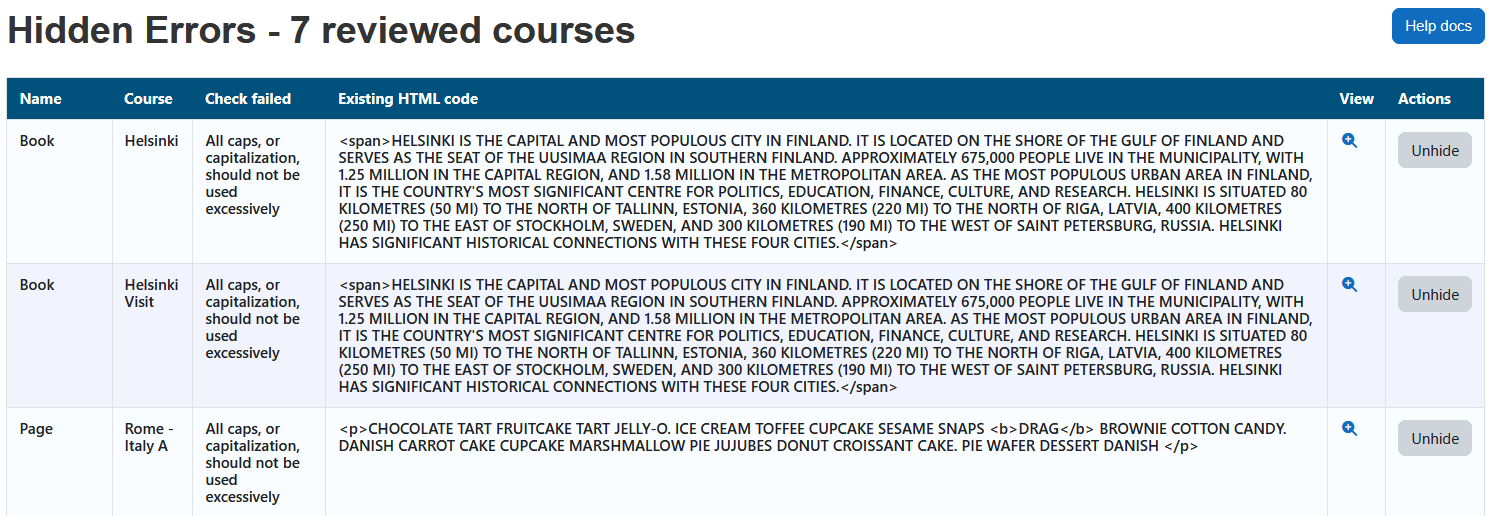
The heading area of the wizard will show how many errors are found, and whether the errors listed are for one course or many courses.
- If the results are for one course, the course name is displayed.
- If the results are for more than one course, the number of courses is displayed.
The table displays a row for each error that contains five parts:
- Name.
- Course.
- Check failed.
- Existing HTML code.
- View – The link to view the error in full context.
- Actions – The button to unhide the error.
Unhide bulk fixed errors
To unhide previously hidden errors:
- Ensure you are viewing the “Hidden errors” page.
- Select the “Unhide” button to unhide the error.
Capability requirements
Access to the Brickfield Accessibility+ Toolkit is controlled by capabilities and users must have the correct capabilities in the correct context.
- ‘tool/bfplus:viewsystemtools’ capability – To view site level reports and wizards.
- ‘tool/bfplus:viewcoursetools’ capability – To view individual course reports and wizards.
- ‘accessibilityplustool/exceptionmanagement:view’ capability – To view this Hidden errrors page, users must have this and one of the capabilities mentioned above.
For more information, go to: Capabilities.