
Brickfield Enable: Outline report
Table of Contents
Introduction
The Outline report provides the ability to view your rates of accessibility compliance across each course module.
N.B.: In the top right of the Outline report is a “Help docs” button that will bring your directly to this documentation page.
Where to find the Outline report
The Outline report can be accessed via:
- From a course: Course actions menu > More > Reports > Accessibility outline report
- From the course block: Accessibility+ Review block > View Accessibility+ outline report (Area chart icon)
How to use the Outline report
The Outline report displays a breakdown of the course modules.
The table displays a row for each module that contains eight parts:
- Section
- Type
- Name
- Check status
- Errors
- Actions
- A link to edit the activity.
- A link to view the module’s errors.
View an accessibility outline of your course modules
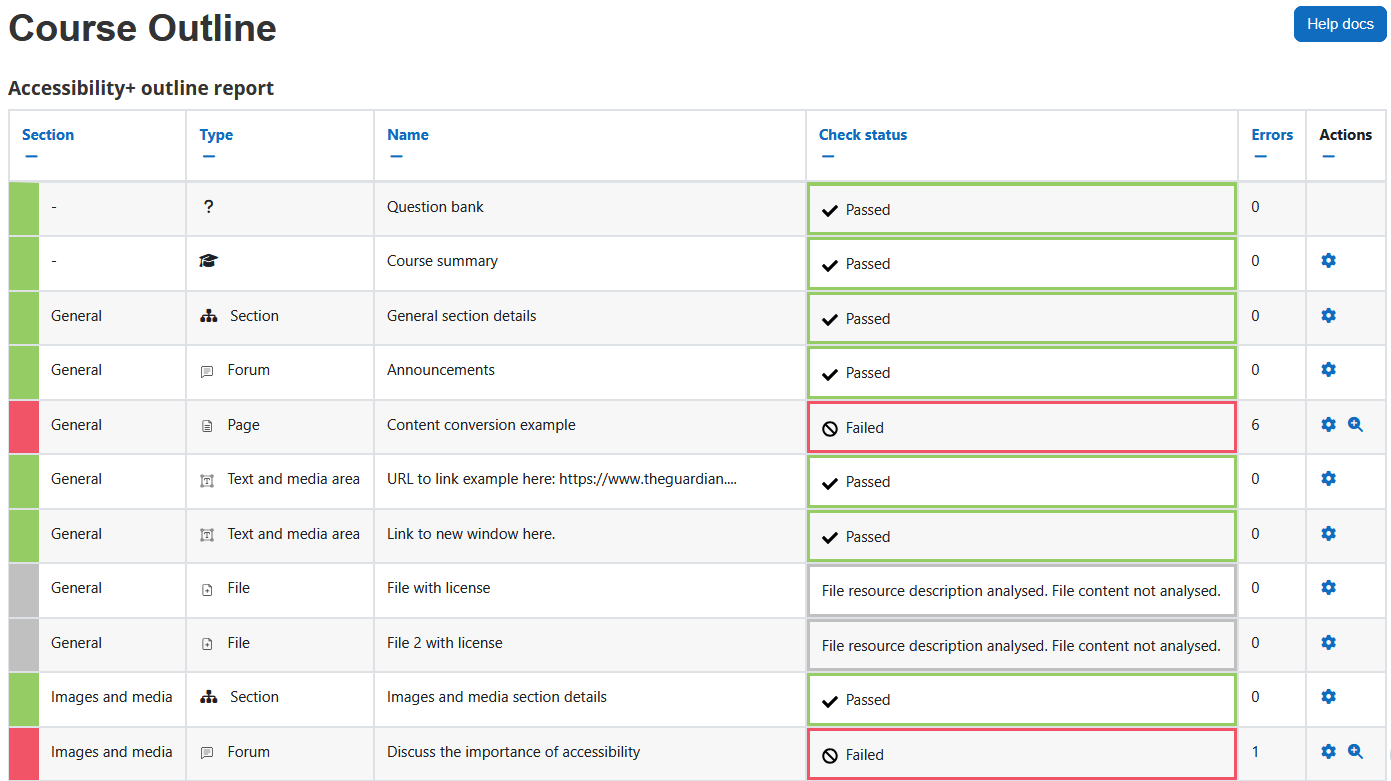
To view an accessibility outline of your course modules:
- Ensure you are viewing the “Outline report”.
- View the table in the report for the breakdown of the course modules.
The available download options for the Outline report
This Outline reports table data can be usually downloaded as the following, however this is dependent on your Moodle site’s admin settings for which download options are enabled:
- Comma separated values (.csv)
- Microsoft Excel (.xlsx)
- HTML table
- Javascript Object Notation (.json)
- OpenDocument (.ods)
- Portable Document Format (.pdf)
Capability requirements
Access to the Brickfield Accessibility+ Toolkit is controlled by capabilities and users must have the correct capabilities in the correct context.
- ‘accessibilityplustool/outline:view’ capability – To view the course outline report.
- ‘tool/bfplus:viewcoursetools’ and ‘accessibilityplustool/outline:view’ capabilities – To access the Accessibility outline report, users must have these capabilities.
For more information, see: Capabilities.