
Brickfield Enable: Retrieving a newly processed alternative file format
Table of Contents
Introduction
Once the user’s file conversion request is completed, they will receive a new notification alert confirming the status of their file conversion. However, if the conversion has already been requested, processed and completed on the site, the file will be automatically downloaded as soon as the request is made.
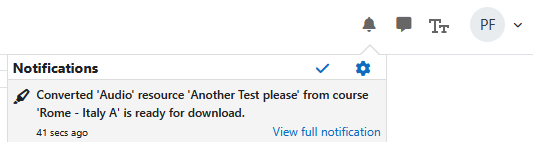
Click on the “(Filename) is ready for download” link to open or download the new file. They can also click on the related “View full notification” link to view all their notification messages. (This is in the Boost theme, so other themes may vary).
In the notifications page, they will see the full notification message, which contains the message details such as “Your document conversion request for ‘Accessibility Basics Handout original.mp3 Audio’ is now ready for download.”. They can also click on this link to open or download their new file.

The user now has access to their new file, in the conversion type and format which they have requested! They can either open it directly or save it to their device to interact with it later.
Capability Requirements
Access to Brickfield Alternate Formats is controlled by capabilities and users must have the correct capabilities in the correct context.
- ‘local/bfaltformat:convertfiles’ capability – Request Brickfield Alternate Format file conversions
For more information, see: Capabilities.