
Badge Share: Site administrator
Introduction
This Badge share plugin optimises the badge page link preview. Hence, when students are sharing their links, their badges preview and display well everywhere.
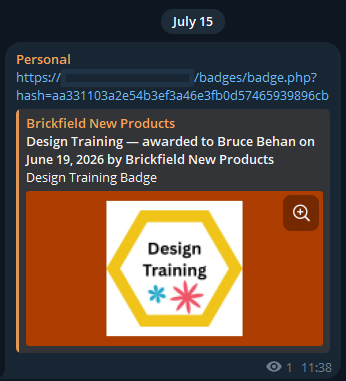
It includes Open Graph and Twitter Card meta tags for Moodle badge pages — so when someone shares an awarded badge on LinkedIn, Slack, Teams, Bluesky, WhatsApp, or any other platform, the preview now shows the badge name, recipient, issuer, date, and the badge image, all public information on the page already.
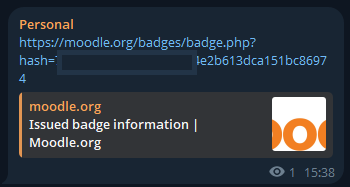
This compares against a default Moodle site’s badge preview display of nothing, because the badge page emits no badge-specific Open Graph metadata.
Administration
This section is for the administration of the Badge Share plugin.
Version Support
This plugin has been developed to work on Moodle releases 4.5, 5.0, 5.1, and 5.2.
Deployment
To install the badge share plugin (local-badgeshare):
- Unzip and copy the badgeshare folder into Moodle’s local/ folder.
- Go to Site administration > Notifications to install the plugin.
Further installation instructions can be found on the Installing plugins Moodle documentation page.
The problem this solves
The problem is that by default, Moodle’s public badge page (/badges/badge.php?hash=…) emits no badge-specific Open Graph metadata. The badge artwork itself is rendered as a base64 data URI inside <img src=”data:image/png;base64,…”>, so social-sharing crawlers can’t fetch it as an image. Pasting a badge link into LinkedIn, Slack, or Bluesky produces a generic, useless preview — even on the latest Moodle, even on moodle.org itself.
This plugin fixes that.
- Open Graph tags on every public badge page (og:title, og:description, og:image, og:url, og:site_name, og:locale, og:type).
- Twitter Card tags (summary_large_image for padded mode, summary for raw).
- A public image endpoint that serves the badge artwork at a fetchable URL.
- An optional padded preview generator that produces a 1200×630 branded banner with the badge artwork centred on a brand-colour background. No text is baked into the image — all human-readable content lives in the meta tags where platforms render it as accessible HTML.
- A title format that carries the credential story: “Badge Name — awarded to Recipient on Date by Issuer”. On compact preview cards (LinkedIn) where only the title is visible, this means the recipient and issuer are still readable.
- A “Share this badge” panel rendered on the public badge page with one-click sharing buttons for LinkedIn, Bluesky, X/Twitter, Facebook, WhatsApp, email, and “copy link to clipboard.” Each button opens the platform’s compose UI with the badge URL prefilled, and the rich preview is then drawn from the same Open Graph metadata.
- Disk cache for padded images, automatically invalidated when a badge is updated, revoked, or deleted.
Why no baked-in text?
- Fails WCAG 1.4.5 (Images of Text)
- Can’t be read by screen readers
- Doesn’t scale with the user’s text-size preferences
- Can’t be selected, copied, translated, or indexed
- All human-readable content now lives in og:title and og:description where platforms render it as accessible HTML. The image is just the image.
Configurations
The Badge share plugin has the following global settings:
- Enable badge social previews
- Preview image mode
- Brand background colour
- Text colour
- Fallback preview image
- Show share panel
- Enabled platforms (on share panel)
- Cache padded preview images
Privacy
The Badge share plugin does not store any personal data in custom tables. It reads existing badge records (recipient name, badge name, issue date, issuer) and includes them in HTML meta tags on the same already-public badge pages where the information is already rendered. Cached preview images mirror the same public badge artwork. A null_provider is registered for GDPR compliance.
Capabilities
Managers and site administrators are able to edit the configurations with the capability local/badgeshare:managesettings.
Testing
The plugin ships with a PHPUnit test suite covering the badge resolver, image provider, meta tag building, and padded image generation.
Copyright and funding
This plugin is developed and maintained by Brickfield Education Labs. Brickfield Education Lab is able to provide support for this plugin.