
Brickfield Mobile: Student
Introduction
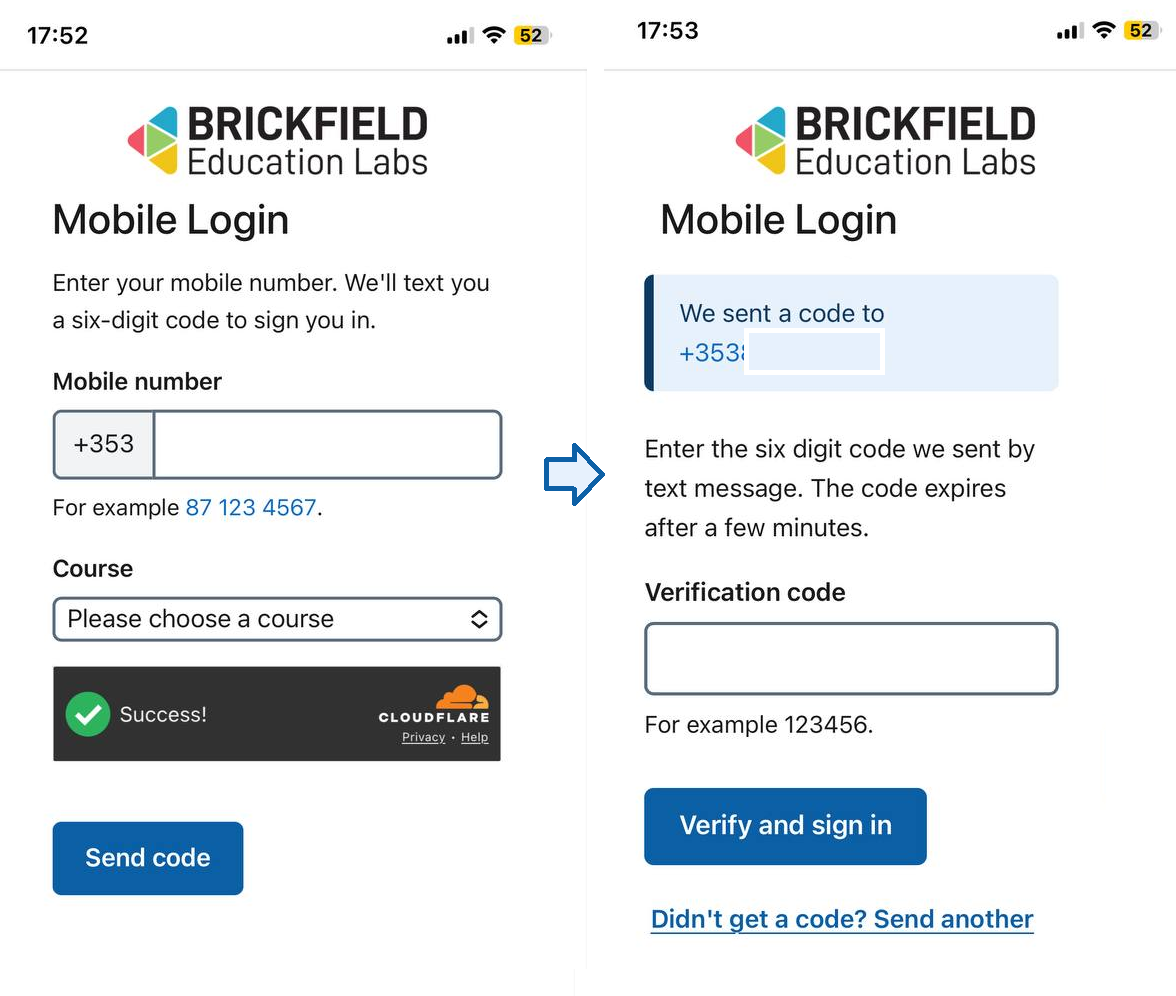
This Mobile authentication plugin (auth_bfmobile) enables a Passwordless sign in for Moodle by mobile number plus a one time code. It is designed as an accessibility-first on-ramp for users who cannot use traditional credentials — for example older learners who do not use email, learners who do not remember their password, or learners whose accounts are administered for them by family members.
What it does
Your login process is simplified by going to a dedicated URL provided by your institution (typically distributed via leaflet, QR code, or course outreach).
You enter your mobile number on the form, receive a one time code by text message, type the code, and are logged in to Moodle. If you have not logged into the Moodle site previously, an account is created for you automatically.
How it differs from a normal auth plugin
The login page is the plugin’s own page at /auth/bfmobile/login.php, not the standard /login/index.php.
You authenticate via SMS code, not username and password. When your account is created in this way, you do not have a password set, as you do not need one.
Your account
Your account starts as an auto-created account named “Phone User XXXX” (with the last four digits of your mobile number).
You can edit your profile to set a real first name, last name, email, and (if site policy allows) a password.
Because this mobile authentication matches on your mobile number rather than email or username, you then keep logging in via your phone number, and the other profile fields become useful for identifying you for normal Moodle features (gradebook, messaging, certificates and so on).