
Page Options: Site administrator
Introduction
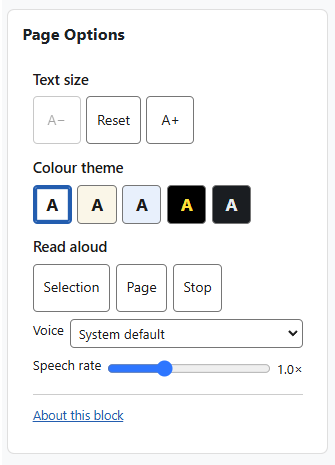
The Page Options block gives every reader a small, self-contained set of on-page tools to adjust how Moodle looks and reads: text size, colour theme, and read-aloud.
Formerly the Accessibility block, it is a complete rewrite and simplification of the original block. It runs entirely in the reader’s browser — there is no third-party toolbar, no server round-trips, and no database table. Read-aloud uses the browser’s own built-in speech, so nothing extra is loaded.
Administration
This section is for the administration of the Page Options block.
Version Support
This plugin has been developed to work on Moodle releases 4.5, 5.0, 5.1, and 5.2.
Deployment
To install the page options block (block_accessibility):
- Unzip and copy the accessibility folder into Moodle’s blocks/ folder.
- Go to Site administration > Notifications to install the block.
Further installation instructions can be found on the Installing plugins Moodle documentation page.
History
Earlier versions of this block (then called the Accessibility block) depended on the third-party ATbar toolbar to provide their tools, along with server-side YUI JavaScript and several endpoints.
This version removes that dependency entirely. Read-aloud now uses the browser’s own built-in speech instead of ATbar, and text size and colour themes are applied with CSS and a small cookie — so the block is self-contained, lighter, and makes no third-party requests.
The old YUI JavaScript, the per-instance colour configuration form, the changesize.php, changecolour.php, database.php and userstyles.php endpoints, and the Internet Explorer workarounds were removed at the same time.
Configurations
There is nothing to configure. The block has no site-level settings and needs no API keys or accounts — add it to a page and it works.
Capabilities
Who can add the block is controlled by the standard Moodle capabilities block/accessibility:addinstance (editing teachers and managers, on a course or other context) and block/accessibility:myaddinstance (any user, on their Dashboard).
Copyright and funding
This plugin is maintained by Brickfield Education Labs. Brickfield Education Lab is unable to provide support or respond to queries/feature requests for this plugin.