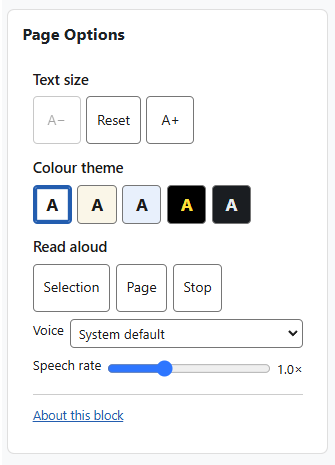
Page Options: Student
Introduction
The Page Options block gives you a small, self-contained set of on-page tools to adjust how your Moodle looks and reads: text size, colour theme, and read-aloud.
It runs entirely in your browser — there is no third-party toolbar, no server round-trips, and delaying database queries. Read-aloud uses the browser’s own built-in speech, so nothing extra is loaded.
Once you choose a setting, it follows you across the whole site: preferences are kept in a single functional cookie and reapplied before each page paints, so there is no flash of the default styling as you move from page to page — even on pages where the block itself is not shown.
Features
Text size. Increase, decrease, or reset the text size for the whole page. The page scales smoothly, and the reader’s choice is remembered site-wide.
Colour themes. Five whole-page colour themes, shown as compact swatch buttons that preview each theme:
- Default — the site’s normal colours.
- Cream — a warm, low-glare reading tint.
- Blue — a soft blue reading tint.
- High contrast — black background, white text and yellow links.
- Dark — a designed dark-grey palette (not a simple colour inversion), so images and videos are left untouched.
Each theme recolours the whole page — the navigation, side drawers and menus, cards, tables, book and quiz pages, and blocks — not just the main content area. Every theme’s colours were contrast-checked against their own backgrounds and meet WCAG 2.2 AA.
Read aloud. Read the current text selection or the whole page aloud using the browser’s built-in speech, with an adjustable speech rate and a choice of voice. The voice list offers the on-device voices installed on the reader’s own computer or device (plus a System default); online, server-streamed voices are deliberately left out because they can fail or fall silent. Reading follows the page’s language marking, so content in another language is read with a matching installed voice. No external service is contacted and no audio is uploaded anywhere — a chosen voice runs on the device. The read-aloud controls are hidden automatically on browsers that do not provide built-in speech (for example some older or embedded browsers). Text size and colour themes work on every supported browser.