
Brickfield Enable: File conversion reporting
Table of Contents
Introduction
The Brickfield Alternate Format reports provide information on conversion requests, the number of conversion requests per file, conversion downloads, the number of conversion requests per user role and the storage space used by conversions –
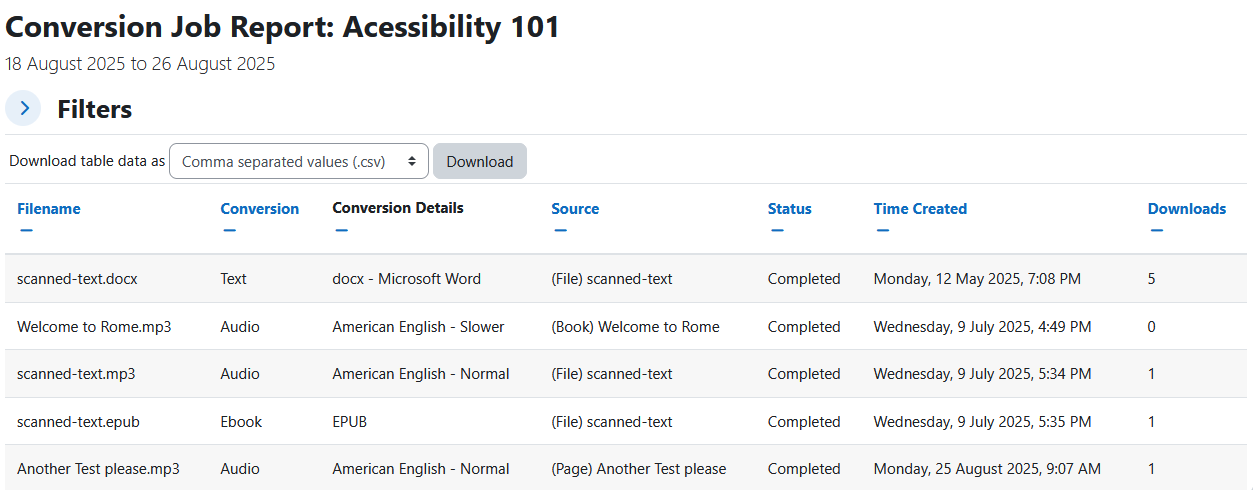
- Conversions: Single conversion requests and their status.
- Alternate Formats: Individual files and their number of requests.
- Downloads: Individual files and their number of downloads.
- Users: Individual user roles (teacher, student, etc) and their number of requests.
- Conversion Errors: Errors generated by the failure of conversion requests.
- File size: File size generated by conversion requested files.
- View all my courses: Viewing conversions of all courses the user has the relevant capabilities for.
Each report has its own set of filter options to sort the data on several different columns, and also has the option to have its full set of information downloaded into a number of different download formats.
Viewing the Brickfield Alternate Format reports
Access to the Brickfield Alternate Format reports is controlled by capabilities as outlined below and can be accessed via:
- Site administration > Plugins > Local plugins > Brickfield Alternate Format > Report for Alternate Formats
- Course’s Actions menu (Boost theme) > More > Reports > File Conversions
- Course administration block (Classic theme) > Reports > File Conversions
If you have course editing permissions in multiple courses, you can view the File conversion reports for all of your courses by clicking “View All my courses” from the single course view of the file conversion reports.
Capability Requirements
Access to the Brickfield Alternate Format reports is controlled by capabilities and users must have the correct capabilities in the correct context.
- ‘local/bfaltformat:viewsystemreport’ capability – To view site level reports.
- ‘local/bfaltformat:viewcoursereport’ capability – To view per course, or courses.
For more information, see: Capabilities.