
Brickfield Enable: Cron and scheduled tasks
Table of Contents
Introduction
The Brickfield Accessibility+ Toolkit analysis and ongoing processing goes on the assumption that your Moodle site is configured with regularly running cron, as always recommended by Moodle HQ for production sites.
However, if you are using the Brickfield Accessibility+ Toolkit on a test site, this may not be the case. Instead, you may have to manually run cron to trigger the different parts of the processes.
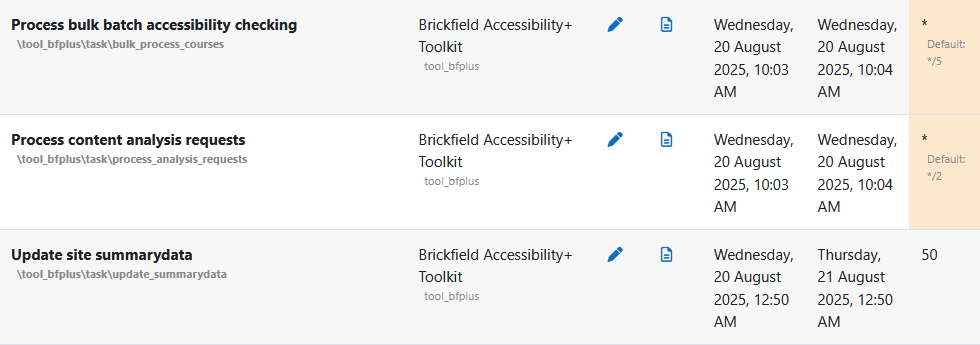
There are three main scheduled tasks which deal with the Brickfield Accessibility+ Toolkit processing of the analysis of the accessibility issues in HTML content.
These are found at Site administration > Server > Tasks > Scheduled tasks.
- Process content analysis requests (\tool_bfplus\task\process_analysis_requests).
- Process bulk batch accessibility checking (\tool_bfplus\task\bulk_process_courses).
- Process bulk caching (\tool_bfplus\task\bulk_process_caches).
For more information on the Brickfield Alternate Format scheduled tasks, see: Alternate format scheduled tasks.
The Ad hoc task “\tool_bfplus\task\process_link” deals with processing links. To see the adhoc task in the cron output, the Brickfield Accessibility+ Toolkit setting “Enable performance tracing” must be enabled. For more information on this setting, see: Configuration.
Scheduled tasks and timings
The default timing settings for these three tasks are not identical, they are set to run every 5, 2 and 50 minutes respectively.
However, we do recommend altering these default scheduled task timing intervals to a more frequent run where possible, such as every 1, 2 or 5 minutes, especially at the start of the usage of the toolkit, so that processing and results gathering is done at a faster and more noticeable pace.
Running scheduled tasks manually
If your Moodle site is enabled to run tasks individually from this page, using the Run now link, you must run them in this exact order, and all of them once, each time, to mirror a normal cron general run. This is due to the separate tasks being in an established progression, one from each other.
However, if you are running cron as one single call, such as running /admin/cron.php from the browser, or running cron as CLI, or running cron normally, the precise ordering of these three tasks is already organised for you by the Brickfield Accessibility+ Toolkit plugin.